
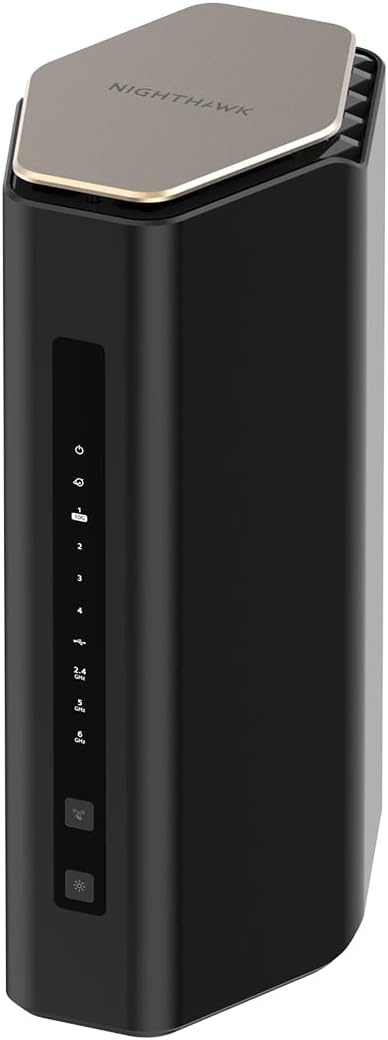
NETGEAR Nighthawk WiFi 7 Router (BE17000) – Router Only, 17 Gbps Wireless Speed, 10 Gig Internet Port, Tri-Band for Gaming, Covers 3,300 sq. ft., 150 Devices, VPN – Free Expert Help
$299.99
Related Products





Unlock new levels of performance with pristine 8K streaming, video conferencing, and immersive gaming with real-time responsiveness. Leverage the power of WiFi 7 for speeds up to 17 Gbps at 2.4x faster than WiFi 6 and 320 MHz high-capacity channels for up to 150 devices. The Nighthawk BE17000 WiFi 7 Tri-band Router offers 3 bands of WiFi, including the ultra-fast 6 GHz band for peak performance with less interference from neighboring networks. The high-performance antenna design provides up to 3,300 sq. ft. WiFi coverage, and you can connect your high-demand devices to the 10 Gig LAN port and three 1 Gig LAN ports for ultra-fast wired speed. Product dimensions: 10.1 x 5.9 x 4 in
Unrivaled WiFi 7 speeds up to 17 Gbps for real-time gaming, 4K/8K streaming, UHD video conferencing, and AR/VR entertainment with easy setup using the Nighthawk App
WiFi 7 delivers 2.4x faster speeds than WiFi 6 to maximize performance across all devices. This is a Router not a Modem, works with any ISP (Internet Service Provider)
This router does not include a built-in cable modem. A separate cable modem (with coax inputs) is required for internet service
Sleek new body offers smaller footprint and high-performance antennas for up to 3,300 sq. ft. of 360-degree WiFi coverage
Compatable with any internet service provider, a separate modem may be needed for your cable or internet service. 10 Gig internet port unleashes the fastest download speeds of today & tomorrow. 1 x 10 Gig and 4 x 1 Gig LAN ports for connection to your cable modem, separate unit
NETGEAR Armor provides a powerful suite of tools to help keep you safe online, including enhanced protection against hakers, malware and identity theft, at home or on the go, includes 30-day trial
Product setup easy with the Nighthawk App. Customers needing any assitance may reach out to NETGEAR at 1.888.638.4327 or go to netgear.com/support for assistance
Made for use in the U.S. only
7 reviews for NETGEAR Nighthawk WiFi 7 Router (BE17000) – Router Only, 17 Gbps Wireless Speed, 10 Gig Internet Port, Tri-Band for Gaming, Covers 3,300 sq. ft., 150 Devices, VPN – Free Expert Help
Add a review
$299.99
Amazon Customer –
Easy and reliable
The Netgear router was very easy to install. I downloaded the app and followed the steps. It took between 5 to 10 minutes. It works very reliable and all my devices such as computer, TV, and tablet connect quickly and Internet works well. Additionally, the router is nicely designed and looks good on top of my cabinet.
Terence Wood –
Upgraded
Title: UpgradedDescription: We noticed immediately multiple devices stopped queuing videos, the blue circle of death disappeared. My smart TV showed better connection right away. The coverage of more sq footage was noticed by my kids in the far rooms. Now I can monitor how many devices, test my speed, and see that my network is handling all my devices better than my previous set up. I did have to call my internet provider for help with passwords, but it was mostly Plug and play. I realized this is the first wifi I have set up with my smart phone, instead of using a home computer. I got a good deal, and this unit works well for my family, thank you
KCB –
Easy setup and good coverage
Whenever we get a new wifi router, there is tension in the house and a high level of fear that it won’t work properly. Fortunately, this router was surprisingly easy to set up and the coverage in our 3,000 sq ft house is quite good. I have been able to take out the wifi extenders that I had to use with our older Netgear router that they suddenly will no longer support.The hardest thing for us to deal with was that we could not use our existing password and had to go to a much more complex one. It’s probably a good thing in retrospect. As a result we had to change router name and password for 50 devices connected to the new router. Now they all seem to be working fine and we are very pleased. We are getting much higher Internet download speed results with this new router than with the old router.Netgear has been a reliable company for our wifi and modem needs over the years.
Matthew –
You will not find WiFi here, only pain.
TL;DR – Frustrating setup process, contrary to the promised “fast and easy” configuration. Range actually seemed worse than my current Netgear router, which is 7 years old. Very unreliable connectivity. Speed was great, when it worked, but that’s the rub. Devices would randomly be kicked off the network and we frequently had to power cycle the modem and router to restore the main carrier signal to get back online. None of this is good for any router, but it’s unacceptable at this price point.Extremely disappointed with this product, which resulted in it being returned. Specifically, this review is for the 17Gbps, 10G Port model, which you know, happens to be the top of the line, most expensive offering. Also, for general knowledge, I attempted to use this device with Xfinity high-speed cable service.Disclaimer: I am not an engineer (lot of folks claiming that these days…IYKYK). I am also not a network admin, SYSOP, BBS, modem-dodem, ICQ, wonder-guru tech guy. That said, I’m not a total dunce with computers. I’ve built my own rigs for over a decade and have configured home WiFi networks for myself, friends and family, so I at least know the basics of what I’m doing.Also, I am normally a fan of Netgear products. I am currently using an older Nighthawk router, one which I went back to using after returning this POS, one which is still running more reliably then this newer, supposed marvel of technology.Okay, let’s get into it. The coolest thing about this device is probably the box and packaging. They really upsell you with the presentation. It’s a good thing, too, because those are the only positive feelings I have left from this item, so it was kind of them to trick me right out of the gate.Basic setup is, well, basic. You plug it in to an outlet and connect it to your modem. However, when it comes to setting up the WiFi network itself, they make you download an app. Okay, whatever, this is nothing new since literally everything has an app these days. They claim it is “easy and effortless setup.” The setup, was in fact, neither easy, nor effortless.After the app was installed, I had to repeatedly go through the basic setup of connecting to my ISP because it kept failing. And this wasn’t a “once or twice” type failure, it easily happened over a half-dozen times before it finally established a connection.Then came the actual network configuration, where you use the preestablished one they provide you, but then change to your own name and login credentials. This was a repeat of the process failing out midway and then having to start all over. This whole “easy setup” easily took over an hour, so yeah, I know that all I was doing was clicking buttons on the app, but it was still frustrating.Finally, finally everything seemed to be getting ironed out and the network was established. Okay, great, let’s start connecting our myriad devices. Surprisingly, this was rather painless. Phones, tablets, PCs, security cameras, TVs, everything seemed to be connecting. I resigned myself to the whole configuration process having just been teething pains, and thought the worst was behind me. How wrong I was.The first 24 hours of usage were…fine…for the most part. One thing I noticed though was that despite speed tests showing good numbers, the perimeter security cameras were all showing lower signal strength than normal and seemed to be taking longer to access the live feeds. That’s…curious…especially considering how strong a signal they had with the old router. This new one is supposed to have nearly twice the coverage range, right? Surely, the manufacturer wouldn’t lie, right?We got about another day of relatively reliable usage and then the problems really started. Devices kept getting dropped off the network and we were prompted to re-enter the password. The cell phones and televisions would show connected but would have “no internet access.” Then we started noticing sluggish performance on the work computers, with frequent drop-offs in connectivity.It got to the point where almost daily, and sometimes even multiple times per day, we had to power cycle the modem and router to get things up and running again. Based on the strange disconnection issues of the various devices, I feel like there had to be something weird going on with the tri-bands and that the 2.4 and the 5 and 6 weren’t playing nicely. I certainly did not diagnose this, but it’s just a hunch.I was not going to bother dealing with tech support. I really don’t have time for that, especially not when I had a perfectly functioning, older router just sitting there that I could plug back in. And plug it back in I did. The older Nighthawk powered back up with the old network still in place and all the bad thoughts went away. Perfectly reliable connectivity was restored at only marginally slower speeds. Oh, and the cameras around the property all had their stronger signals back. Funny how that works.I really wanted to like this product because the promise of faster speeds and greater range was, well, promising. Alas, it was not to be, and so, with a tear in my eye, I packed it up and started the return process. Maybe I got a dud, but when you consider that this is their top model, that’s not really excusable in my book. As I mentioned earlier, I’ve used Netgear products for years (and still do, technically), but I will be looking elsewhere for a router upgrade because I’m simply not willing to roll the dice on another one after this experience.
Labdad –
Set-up is not as easy as promoted. Overall the router works well.
The router set-up is not flawless. The Nighthawk App is glitchy. Started with following instructions to use the Nighthawk App. I followed each,step and towards the end of set-up, either the App, or router hangs. Being an old school network guy, I logged into the router and did the set-up there. Once I got set-up via the local,web browser, the interface in the Nighthawk App synced with the router and there it is, the tri-band router is,working. I really like the 6G WiFi for my devices. I also created a Mesh wireless network using the the Netgear EXS25 and EXS27 extenders. Again I tried the Nighthawk App set-up, hangs and clunky. I resorted to plugging in a lan/etherenet cable into the ports and configured manually. Worked well. Again the Nighthawk App finally caught up after the manual web,based set-up. Netgear please fix that clunky Nighthawk set-up App. A novice will find this frustrating and may return the product. Perhaps you should also publish,how to set-up using the web interface. I would have given this 3 stars but for now 4 will suffice. Once the nework,is running,it is a breeze to admimister. Also with the 3000 sq foot coverage of the router plus 2 wifi extenders, the whole house is completely covered with no weak or blind areas.
Amazon Customer –
Very good item! Very happy!
Very good item! bought this router recently as I was moving. First Day, set up was easy, download app, make quick account, plug in, boom, done. I have had previous nighthawk routers, and I will continue to use them as I move forward!
Daniel Gilbert –
Easiest Setup Yet
Description: I owned and utilized an older Nighthawk router for years. While I was able to setup that router, it was not the easiest or quickest process. Thankfully the installation process has definitely improved since that time. I had no issues at all installing my new Nighthawk Tri-Band WiFi 7 Router. Installation was quick, easy and intuitive. This router works like a charm.